
Taking The Next Step with Your Photography

Back to School Giveaway Week, Day Three:

Those who have followed my blog for a while or have ever seen me participating in one of I Heart Faces’ Fix-It Friday memes will know already that I am a huge Lightroom fan. I bought Lightroom 1 a while ago after trying out the free trial version. At the time, I had already upgraded from Adobe Photoshop Elements to Photoshop CS3, and I really thought that I would have no use for Lightroom. As soon as I “tried it on for size” I knew it was a perfect fit for me. I haven’t looked back since. I use Lightroom for 98% of my photo editing, including just about every photo that comes through my blog.
 When I was given the opportunity to review the newest version of Lightroom, I had to hold back the excitement. I had been drooling over the features that were added to Lightroom 2 for a while, and was eager to find out what features were added to Lightroom 3.
At first, Lightroom 3 felt pretty much the same as what I’d been using. I was happy to see that my saved presets from LR1 transferred automatically, and it was simple to import all of my pictures into the new virtual library. I was happy that LR3 didn’t change too much, so that I still felt “at home” and knew where to find everything. Like I said, Lightroom has always been very intuitive for me to use and navigate.
After I got into the program a little more and using it for a few weeks, I am blown away by the added power that this version has! My 2 favorite features that were HUGE upgrades from LR1 have been the Adjustment Brush and the more powerful noise reduction. I am totally sold on this program!
Here’s a little bit of information from Adobe:
Lightroom 3, the newest version of Adobe’s software, is designed for both amateur and professional photographers to handle growing image libraries. Adobe® Photoshop® Lightroom® 3 software helps you bring out the best in your photographs, whether you’re perfecting one image, searching for ten, processing hundreds, or organizing thousands.
Create incredible images that move your audience. Experiment fearlessly with state-of-the-art nondestructive editing tools. Easily manage all your images. And showcase your work in elegant print layouts, slide shows, and web galleries, as well as on popular photo-sharing sites. All from within one fast, intuitive application.
Lightroom 3 New Features
· A brand new import experience that makes it easier to get your photos organized
· Stronger noise reduction to help clean up even the highest ISO shots
· Easy, flexible watermarking for professionals
· Tools to help fix distortion from using popular lenses and a straighten tool
· Customizable print layout creation
· Simple, fast output options for Web sharing services (direct integration with Flickr)
· Tethered capture to get your shots to appear instantly on your computer
· Sharable video slideshows
· New grain and vignette tools to give your photos artistic/professional flair
· And many more
Enjoy this video from Lightroom expert Julieanne Kost that walks you through the new features: http://tv.adobe.com/watch/getting-started-with-adobe-photoshop-lightroom-3/whats-new-in-lightroom-3/
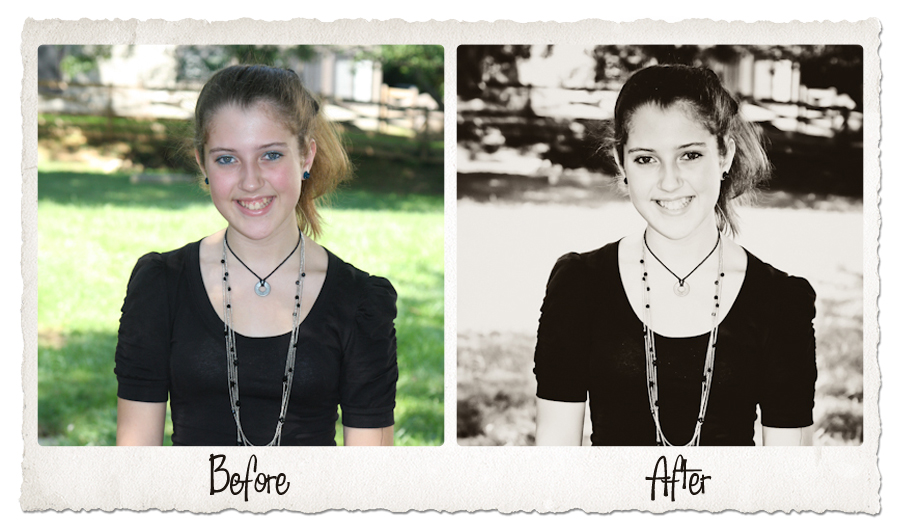
Here are a few examples of what Lightroom 3 has helped me do with my photos:


The Giveaway:
This is a slightly different type of giveaway…something I’ve never done before! I am giving away a personal photo editing package for two people. Each winner will have the chance to submit up to 10 of their personal images that they would like me to edit and “fix up.” I can touch up blemishes, turn a photo black and white, improve the color/saturation, crop, you name it (no head swaps for this giveaway, though…). You give me the photos, and I will send you back several edited versions.
All you have to do to enter is tell me what your photography trouble spot is. Do you struggle with lighting, composition, inspiration, focus, editing? Tell me about it! There is no wrong answer.
The extras:
- Follow me on twitter and tweet about this giveaway. You can do this once a day. Sample tweet:
- Can’t get your pictures to turn out the way you pictured them? @1momof5 can help w/a photo editing #giveaway http://betterinbulk.net/ALR3
- Follow my blog via Google friends connect.
- Subscribe to my blog’s RSS feed or get email updates when I post
The fine print:
Adobe sent me a full copy of Lightroom 3 to review, but the opinions and experiences with this incredible photo editing software are all my own. Before and after shots are also my own work.
This giveaway will end on Wednesday, September 8, 2010 at 11:59 pm Eastern Time. Two winners will be chosen at random and notified by email. Good luck!
Related posts:


[...] Taking The Next Step with Your Photography (betterinbulk.net) [...]
Lightroom is amazing! It saves us literally hours every day editing. It’s speed editing at it’s finest.
TJ McDowell´s last blog ..Increase Website Traffic By Posting Wedding Pictures Online
[Reply]
editing!! That is my biggest problem. I currently use GIMP and don’t really know how to use it.
Jess´s last blog ..Somewhere
[Reply]
Twitter: amelie522
said:
I’m thinking of getting Lightroom, but I may need a tutorial on how to use it. I may be begging you for mercy, so expect an email from me!
Tricia´s last blog ..Trust
[Reply]
This is the BEST giveaway for me, I struggle with editing big time. I have PSE7 and I really still don’t have it down the way I would like to!
jamiedelight @gmail.com
[Reply]
Twitter: tatertwins
said:
I think my biggest problem is actually using my camera! I am new to owning a DSLR and I’m trying to figure it all out. Then I’ll work on lighting, composition and all that

Jayme´s last blog ..Wordless Wednesday- Baby Storage
[Reply]
Twitter: projectalicia
said:
How lucky are you!!!! I’d LOVE to try this one.
alicia´s last blog ..The Million Dollar Idea
[Reply]
[...] is no wrong answer. This giveaway will end on Wednesday, September 8, 2010 at 11:59 pm Eastern Time Here Reply With [...]
Lightroom is super program. Count me too, please. Thanks!
[Reply]
I can never decide whether to keep the original color or switch to black and white. And then, I do what most parents do…..I’m waiting to get the “perfect” picture that I miss out on the candids
[Reply]
I follow you on google friend connect
Katie O´s last blog ..Day 2- Food Types for your Kit
[Reply]
I dont know, but I always look tired, I think I need to hold my head different or show more whites of my eyes.
[Reply]
I would LOVE this! I have so much trouble with focus. I absolutely love the pics in which the subject is sharp and the background is blurry. I have a great camera, but the user is not so great
[Reply]
Twitter: diannakennedy
said:
Oh, my. What do I NOT struggle with? Any shot I take that I LOVE is usually totally by accident. Sigh
[Reply]
My problem is lighting when I try to take a portrait of myself with my husband, because our skin colorings are so different, we seem to need different exposures for each of us
[Reply]
I think my trouble spot is getting the lighting and coloring right. I want my pictures to have that beautiful glow, but have a hard time finding it. Guess I should give Lightroom a try!
Honey Mommy´s last blog ..Wyoming Road Trip- A Photo A Day- Week 35
[Reply]
I would love to get a light room… but I would have to read up on it more first. suelee1998 @ gmail.com
[Reply]
I really need this… I am not good with lightning…flash or no flash, that is my problem.
[Reply]
I am just a beginner so I need help with every step of photography!
[Reply]
I now follow you via Google Friends Connect
[Reply]
I now get your email updates!
[Reply]
I have trouble with the lighting, my camera isn’t the greatest but I can’t seem to get the lighting down
[Reply]
I follow via GFC
[Reply]
I follow via Google Reader
couponinggirl at gmail dot com
[Reply]
My biggest problem right now is lighting. Right now I am having to relearn a lot when taking photographs with my digital camera. I do just fine if I use the auto feature but I would like to be efficient in manual as well.
[Reply]
I follow you on Twitter and tweeted about your giveaway
https://twitter.com/THRansom/status/23947841742
[Reply]
I follow your blog via GFC
[Reply]
I am an email subscriber
[Reply]
I think I have problem editing photos, and with the light, sometimes I find it hard to focus people in the pictures
[Reply]
follow you on twitter
@adalia080
adaliadelcompar at gmail dot com
http://twitter.com/adalia080/status/23960270815
[Reply]
Follow you publicly with GFC
Adalia
adaliadelcompar at gmail dot com
[Reply]
RSS feed suscriber
adaliadelcompar at gmail dot com
[Reply]
I struggle with lighting!
[Reply]
Leave your response!
Subscribe, Share, Stalk…
Support Those That Support This Site!
Click Here to Learn How to Make Money Blogging
LinkShare Referral Program
Shop my store at OpenSky
Follow Me
I’m on Facebook!
Worth Mentioning
Medicare Part D coverage information and quotes are available at MyMedicare.com the nations #1 Medicare supplemental insurance guide.
Daily Deals on Juice in the City
My Other Sites
Simply You Photos
Family Food (My Recipes)
My Blog Roll
Categories
Archives
Search Me?
BlogFrog
Tags
Stats
Most Viewed